PicsPro - Photo Editor Effects2.0.9.0
Publisher Description


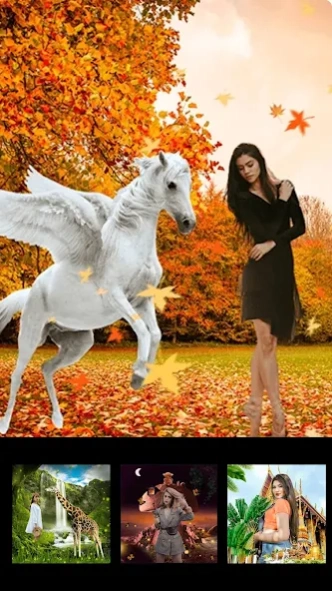

Picture edit with photo frame, effect template maker AI cutout background eraser
PicsPro Nature Photo Editor is an all-in-one photo editor with everything: You can add the drip art effect ,blend effect neon and spiral frames nature photo effect for your photo and with AI cutout background eraser.
With PicsPro Nature Photo Editor - Blend,Drip,Free Background Eraser you will discover the all-in-one photo editor pro . PicPro will give you everything you need. Make the magic blend photo effect and add neon wings and amazing Nature frames for your photo .
— — Feature — —
🌈
AI Photo Cutout
PicsPro Photo Editor with photo editor & photo effect to remove unwanted background from any photo with PicPro AI cutout.
🌈
Cutout Templates
With beauty cutout templates you can make the effect for your photos . There are neon templates and drip art templates and blend double exposure effect . With this cutout templates you can just one tap to use it . And You will get more like for Instagram Twitter and Facebook and so on .
🌈
Free Background Eraser
At the same time you can use the background eraser to edit your photos as you like .
🌈
Neon and Drip photo effect / Blend photo editor
1. With 500+ amazing drip effect and blend effect photo editor! will be make your images more artistic.
2. Use background eraser background changer to make your picture unique.
3. At the same time ,you can use the neon effect and colorful photo editor effects with PicsPro Photo Editor - Blend,Drip,Free Background Eraser.
🌈
Background Eraser and background changer
With PicsPro Photo Editor - Blend,Drip,Free Background Eraser , you can personalize the background with AI cutout function ,and you can change the background with 500+ magic background effect . Take the effect and enjoy the effects with Picspro photo editor.
🌈
500+ Magic pics layouts templates
-Get more cutout templates with picspro
-Polished blend and frames and drip neon effects
-With 500+ popular AI pics layer photo editor you can get more like with PicPro Photo Editor .
-PicsPro Photo Editor will update the templates periodically
You can cutout your photos as you like ,you can easily pick the photo shape with your finger to cutout photos and change the background with picspro
With the
500+ cool drip effect and blend effect and AI cutout .
You and change your background and make your photos be unique. You can pick a photo from your gallery and use our AI cutout background eraser to change the background And share the amazing drip and blend and magic cutout effect for Instagram/ WhatsApp and Snapchat and so on . Get more like with PicsPro Photo Editor - Blend,Drip,Free Background Eraser.
If you have some suggestions please send the email for us : baiwang2013@gmail.com
About PicsPro - Photo Editor Effects
The company that develops PicsPro - Photo Editor Effects is Photo Editor Perfect Corp.. The latest version released by its developer is 2.0.9.0.
To install PicsPro - Photo Editor Effects on your Android device, just click the green Continue To App button above to start the installation process. The app is listed on our website since 2025-08-08 and was downloaded 4 times. We have already checked if the download link is safe, however for your own protection we recommend that you scan the downloaded app with your antivirus. Your antivirus may detect the PicsPro - Photo Editor Effects as malware as malware if the download link to com.photoeditor.blend.effect.pics.cutout is broken.
How to install PicsPro - Photo Editor Effects on your Android device:
- Click on the Continue To App button on our website. This will redirect you to Google Play.
- Once the PicsPro - Photo Editor Effects is shown in the Google Play listing of your Android device, you can start its download and installation. Tap on the Install button located below the search bar and to the right of the app icon.
- A pop-up window with the permissions required by PicsPro - Photo Editor Effects will be shown. Click on Accept to continue the process.
- PicsPro - Photo Editor Effects will be downloaded onto your device, displaying a progress. Once the download completes, the installation will start and you'll get a notification after the installation is finished.
Program Details
System requirements
Download information
Pricing
Version History
version 2.0.9.0
posted on 2025-08-09
add background change effect
version 2.0.8.3
posted on 2024-08-27
Update new background filter for you !
version 2.0.7.2
posted on 2024-08-27
🎄Merry Christmas! 🎄
🎉Update christmas and new year filter for you !
version 2.0.6.0
posted on 2023-12-08
1. Optimize the cutout background function
version 1.8.1.2
posted on 2023-05-06
1.Optimize the AI Cutout experience
version 1.8
posted on 2021-10-15
1.Add more magic,nature , photo effects
2.AI cutout background changer and background remove。
version 1.33
posted on 2021-07-02
1.Add more photo effects
2.AI cutout background changer
version 1.2
posted on 2021-05-12
1.Drip effect,neon,flower,love effect s
2.blend and frame effects
3.AI cutout background eraser
version 1.1
posted on 2021-02-22
1.Drip effect,neon effect,blend and frame effects
2.AI cutout background eraser
